
Better Survey Design = Better Decisions
Designing a high-quality survey is a critical, but often overlooked skill in market research. A great survey delivers clear, unbiased, actionable insights. A poorly designed one can mislead your team, confuse respondents, waste budget, and derail strategic decisions.
This Pollfish School guide walks you through how to design a survey, choose the right audience, write effective survey questions, and use Pollfish tools to improve data quality and respondent experience.
Whether you’re running a brand study, product test, audience segmentation, or ad evaluation, these survey best practices will help you collect stronger insights from the very start.
1. Start With a Clear Research Goal (Pollfish AI Survey Builder Can Help You Define One)
A strong survey always begins with a clear, actionable research goal. But from the thousands of surveys we review every month, many customers aren’t fully sure what they need to ask or which decision the survey will inform. That’s completely normal, and now, Pollfish can help.
Let Pollfish AI Help Define Your Goal
If you’re unsure how to articulate your goal, the Pollfish AI Survey Builder can assist. Try prompting it with something like:
“Can you help me define my research goal?”
…our trained AI will actually ask clarifying questions first, helping you sharpen your objective before suggesting survey content – just like an expert researcher would.
The AI will guide you until you have a clear, well-formed objective – then it will build the survey structure around it.
✔ Why Research Goals Matter
Your objective determines:
-
What questions you need
-
Who your audience should be
-
Whether you need screening questions
-
Which analysis will be meaningful
-
How confident you can be in the insights
A vague goal leads to vague data.
A specific goal leads to actionable insights.
✔ Strong vs. Weak Research Goals
Examples…
| Weak Goal | Improved, Actionable Goal |
|---|---|
| Evaluate customer satisfaction. | Identify top dissatisfaction drivers among new users within 30 days. |
| Understand shopper attitudes. | Discover which three product attributes most influence purchase decisions among frequent Target shoppers. |
✔ Pro Tip
Write this sentence first:
“I need this survey to help me decide ________.”
If you can’t fill in the blank, lean on the Pollfish AI Survey Builder to help you clarify.
Help Define My Research Goals →
2. Choose Your Audience First (Pollfish Expert Recommendation)
Many DIY researchers jump straight into writing questions, but even the best survey questions won’t help if you’re speaking to the wrong people.
Our research experts recommend choosing your audience first.
Why?
Because your audience determines:
-
Which questions make sense
-
Whether you need screening questions
-
How much context respondents already have
-
Whether your research goal is feasible
✔ Pollfish Targeting Options
Pollfish provides powerful targeting criteria to connect your survey with the precise audience you need – streamlining your research and eliminating the need for extensive screening questions.
You’ll find a wide range of targeting criteria, including:
-
Demographics (age, gender, income, ethnicity)
-
Geography (country, region, state, DMA, ZIP)
-
Consumer Lifestyle (ailments, hobbies & interests, vehicle ownership, streaming activity, travel)
-
Employment (employment status, industry, job title)
Behavioral Data (verified purchasers and shoppers by retailer, category, and brand, as well as visitors to specific websites)
3. Add Screening Questions When Necessary
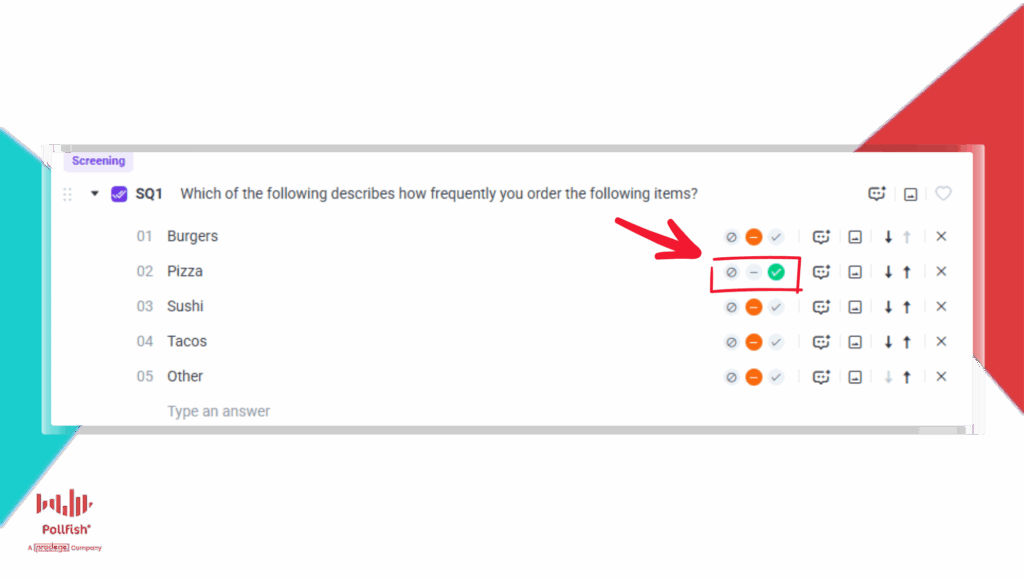
If the built-in Pollfish audience targeting isn’t enough for your project, screening questions help ensure you reach the right respondents.
But they must be used correctly – otherwise they introduce bias or confuse participants.
✔ Screener Best Practices
-
Always place screeners at the very beginning of the survey. (Pollfish allows for up to 6 screening questions per survey)
-
Use blinded questions so respondents don’t immediately recognize the target audience you’re seeking and alter their answers to qualify (example below)
-
Avoid Yes/No formats – use frequency or multi-select instead
-
Use platform logic to automatically terminate respondents who don’t qualify based on their answers.
-
Consider adding a friendly congratulatory note after the final screener to improve the respondent experience, such as: “Congrats, you’ve qualified for this survey”
✔ Example Screener (Poor → Better)
Poor: “Do you like pizza?”
Better (Blinded): “Which of the following describes how frequently you order the following items…?” (with options for Tacos, Burgers, Pizza, Sushi etc, on a frequency scale)
A helpful reference for screening questions: How to use Screening Questions like a pro
💡Using the Pollfish Audience for your project? We’ll review your survey before launch to ensure your setup gets the results you need.
4. Write Clear, Concise, Unbiased Questions
Question quality directly determines data quality.
Here’s how to write survey questions that produce actionable insights, without confusing or influencing respondents.
✔ Follow the 3 C’s of Effective Survey Design
Clarity – Write questions that are easy to understand. Use simple language. Avoid jargon, acronyms or technical language.
Conciseness – Shorter surveys = higher completion rates. Aim for under 30 questions.
Communication – Every question should tie directly to your goal. If a question won’t be used in your analysis, remove it.
✔ Follow a logical flow
Structure your survey like a story – move from general topics to more specific ones. For instance, you might start with broad questions about shopping habits before diving into topics related to a specific product.
- This avoids “tipping off” respondent to the survey’s core objective too early, which helps prevent biased responses.
- It creates a natural and logical progression of questions, making the experience more comfortable and intuitive for the respondent.
✔ Use the right question types
Pollfish supports many question formats, including:
- Multiple Choice (Single Selection): Used when a respondent can choose only one response. This is best for scale questions or identifying favorites and most important attributes. Always include options for ‘Other’ or ‘None’ if your answer list is not exhaustive to avoid forcing respondents into an inaccurate choice.
- Multiple Choice (Multiple Selection): Allows respondents to choose more than one response. You can also limit the number of selections (e.g., “Pick the top three”). Always include options for ‘Other’ or ‘None’ if your answer list is not exhaustive to avoid forcing respondents into an inaccurate choice.
- Rank Order: Enables respondents to list items in order of preference or importance.
- Likert Scale: A common format where respondents rate their level of agreement or disagreement with a series of statements on a scale (e.g., Strongly Agree to Strongly Disagree).
- Matrix Questions: Collects data on two or more variables at once, often displaying multiple items to be rated using the same Likert scale format.
- Open-Ended Questions: Allows for free-form text responses, providing qualitative data. These should be used sparingly, as they are more taxing for respondents and take longer to analyze. It is best to place them about three-quarters of the way into the survey to avoid early fatigue.
- Numeric Open-End: Prompts the respondent to provide a specific numeric value. It’s best to use recent time frames and ask for whole numbers to make recall easier.
- Drill Down: Simplifies long answer lists for respondents. For example, instead of a single long list of cities, you can have respondents drill down from region to state and then to their city.
✔ Avoid common pitfalls
Just as important as knowing what to do is knowing what not to do. Avoiding these common pitfalls will protect the integrity and validity of your data.
- Biased and Leading Questions: These questions subtly encourage a desired response, which undermines the validity of your results. Always strive for neutral phrasing.
- Biased: “How wonderful was your experience with our customer service team?”
- Neutral: “How would you rate your experience with our customer service team?”
- Absolute Words: Avoid using words like ‘always’, ‘every’, or ‘never’. These words force respondents into extreme choices and can decrease the accuracy of their responses.
- Double-Barreled Questions: These are questions that ask about two separate sentiments at once (e.g., “How satisfied are you with our website and social media?”). This results are useless because you cannot know which item the respondent is referring to. Always split these into two separate questions.
- Unnecessary Questions: Briefer surveys provide better results. Don’t add extra questions that won’t be used in the final analysis. Every question should have a clear purpose.
- Distracting Formatting: Avoid unusual capitalization or spelling errors. Inconsistent design can distract the respondent from the intent of the question.
5. Improve Respondent Experience & Data Quality
✔ Use visuals for clarity
Accompanying your questions with images or videos can be an excellent way to add interest and clear up any potential confusion. Say you want to gauge consumer sentiment about a new product design, it’s far more effective to show an image of the new smartphone and ask what a respondent would be willing to pay for it, than to describe it in a long block of text.
Images and videos help with:
- Concept tests
- Product design evaluations
- Ad tests
- Pricing or packaging studies
✔ Add control measures
- For longer surveys (15+ questions), consider inserting a quality control question in the middle of the survey to ensure respondents are actively engaged and paying attention. A simple instruction like, “To show you’re paying attention, please pick the third selection in this list of options,” can help identify inattentive participants.
- Include at least one open-ended question as a secondary quality control measure.
- As standard Pollfish automatically reviews, removes and replaces any low quality responses to your survey.
You can learn more about our data quality certifications, controls and processes here
6. Test, Review, and Validate Before Launch
Before launching to your full audience, you should always test your survey.
A fresh pair of eyes can help here. Ask colleagues to preview the survey to catch any overlooked errors. And also review any routing logic and skip patterns. The easiest way is to invite colleagues to join your Pollfish Team (you can have unlimited team members, completely free) and have them preview the survey there.
7. Launch With Confidence
Once you’re happy with your survey design, you can go ahead and checkout – which submits your survey for approval to our expert team.
To ensure quality, all Pollfish surveys undergo a manual quality review by our research operations team who check for:
-
Biased wording
-
Over-targeting
-
Feasibility issues
-
Problematic logic
-
Poor respondent experience
-
Designs that may skew results
If we spot any risks, we notify you before the survey fields – giving you the opportunity to review, revise and save your project from any costly mistakes.
8. Analyze Your Results With Pollfish AI
If you want to see insights, not just spreadsheets, then Pollfish’s Data Visualization service can help. It transforms complex
data into clear, impactful insights for key decision makers.
Our platform updates in real-time with data collection, providing fast results and adding confidence with verified behavioral data.
Easily create presentations with automatic chart creation and data updates, exportable into your custom, editable PowerPoint templates.
This collaborative approach ensures stakeholders can quickly and effectively understand critical insights without getting lost in spreadsheets.
Conclusion
Thoughtful, strategic survey design is the most effective path to generating insights that drive better business decisions. From setting clear goals and defining your audience to meticulously crafting each question and leveraging powerful platform tools, every step in the process contributes to the final quality of your data. By embracing these best practices, you can ensure that your research is not just informative but also reliable, actionable, and a true strategic asset for your organization.